
Baby & Leave Runway
Enjoy your leave, knowing the money is planned. See whether your savings and leave pay carry you through - and the month it gets tight.
- Your whole leave on one timeline
- Leave pay in stages: employer, state, unpaid
- What a baby costs, in three buckets
- Full-time or part-time return, after childcare
- Baby & Leave Playbook, a 10-page PDF
One-time payment. Instant download. No account needed.
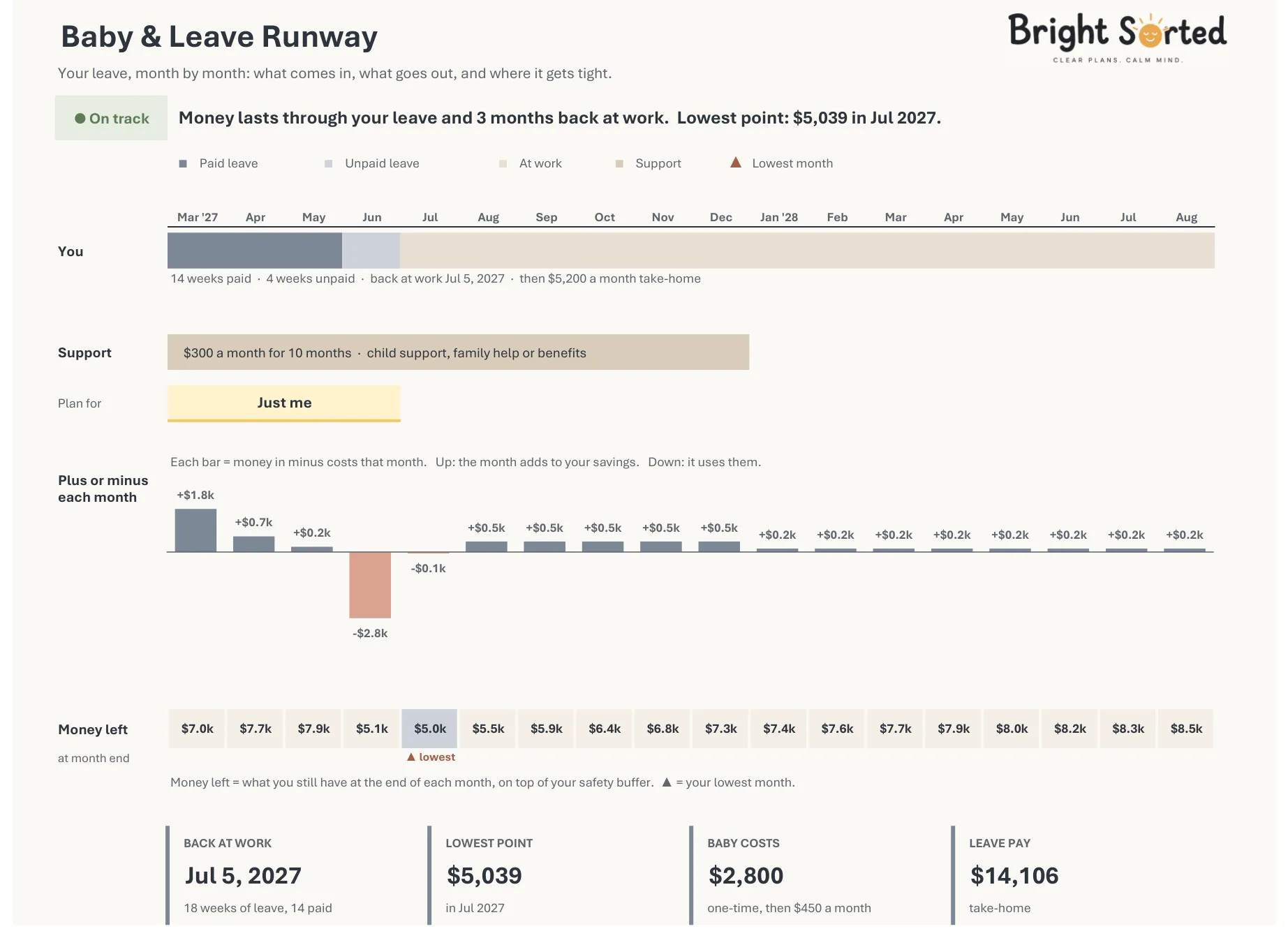
Does the money last until you're back at work?
Your leave pay, your baby costs and your savings on one timeline. A plain status sums it up - On track, Tight or Short.
Your whole leave, on one page.
Your status, your leave on a timeline, the plus or minus of each month and the money left at the end of each one.
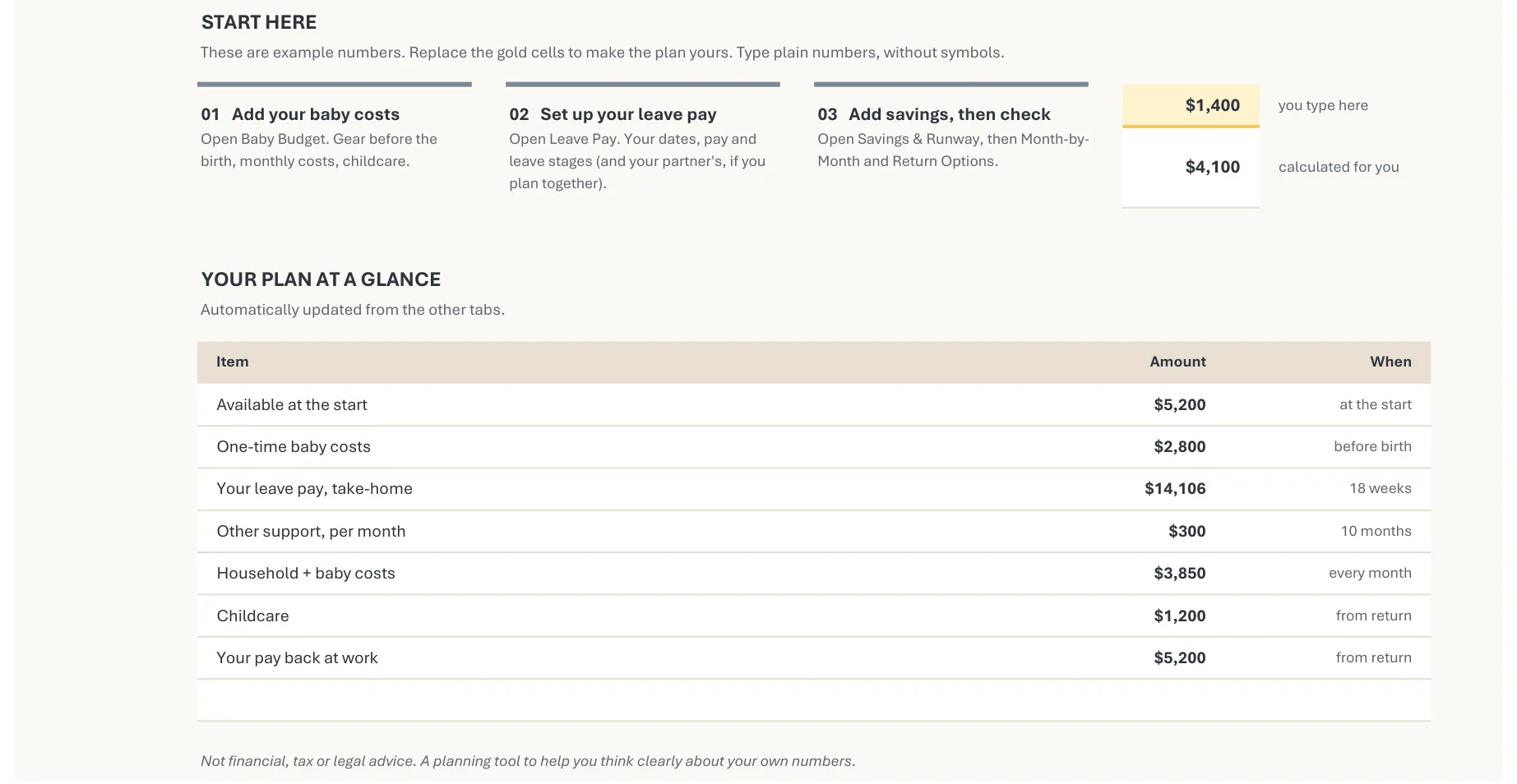
From your leave dates to the month it gets tight.
- 01
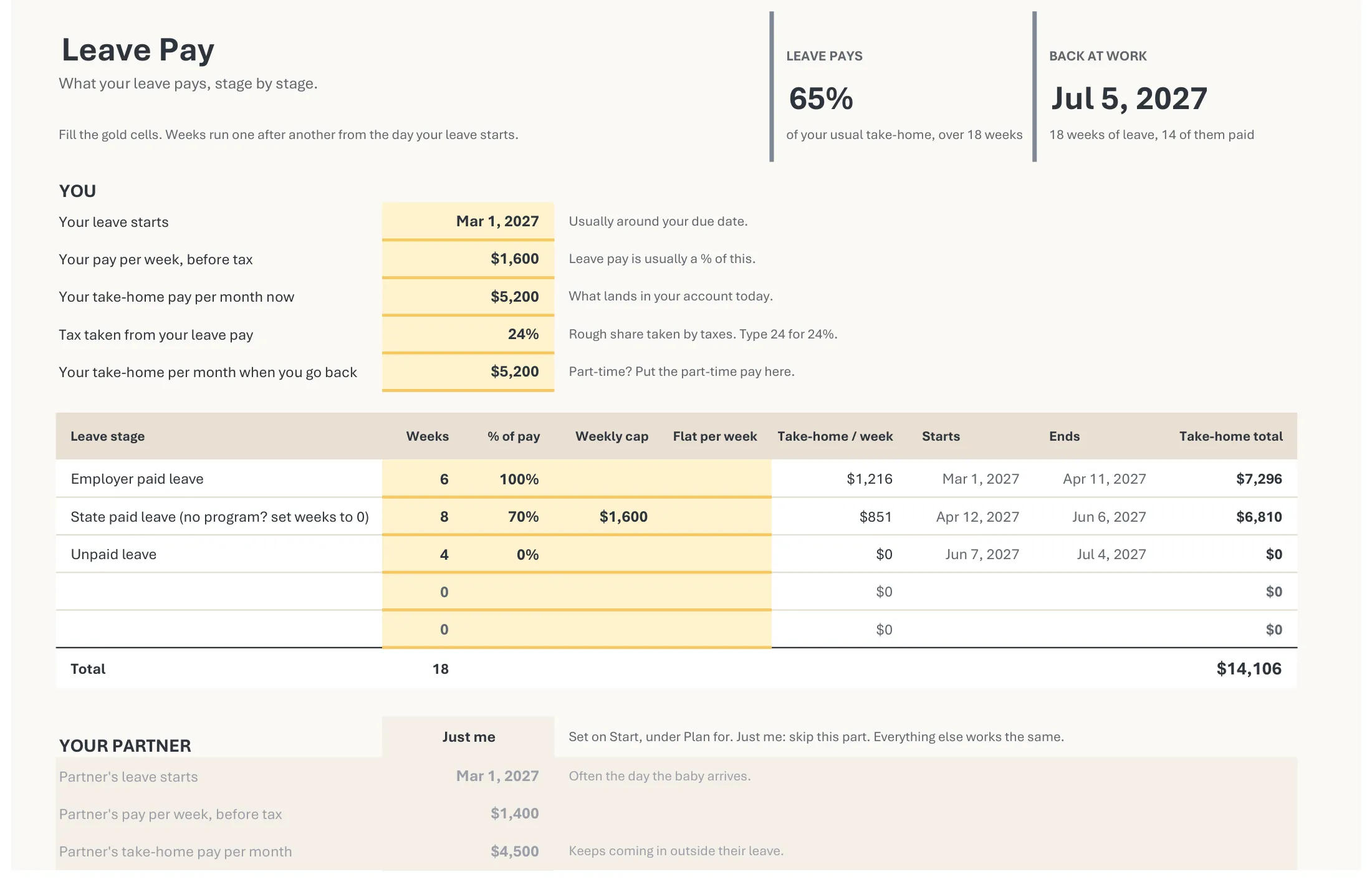
See what your leave really pays.
Your leave in stages - employer paid, state paid, unpaid - with weeks, % of pay and a weekly cap.
- 02
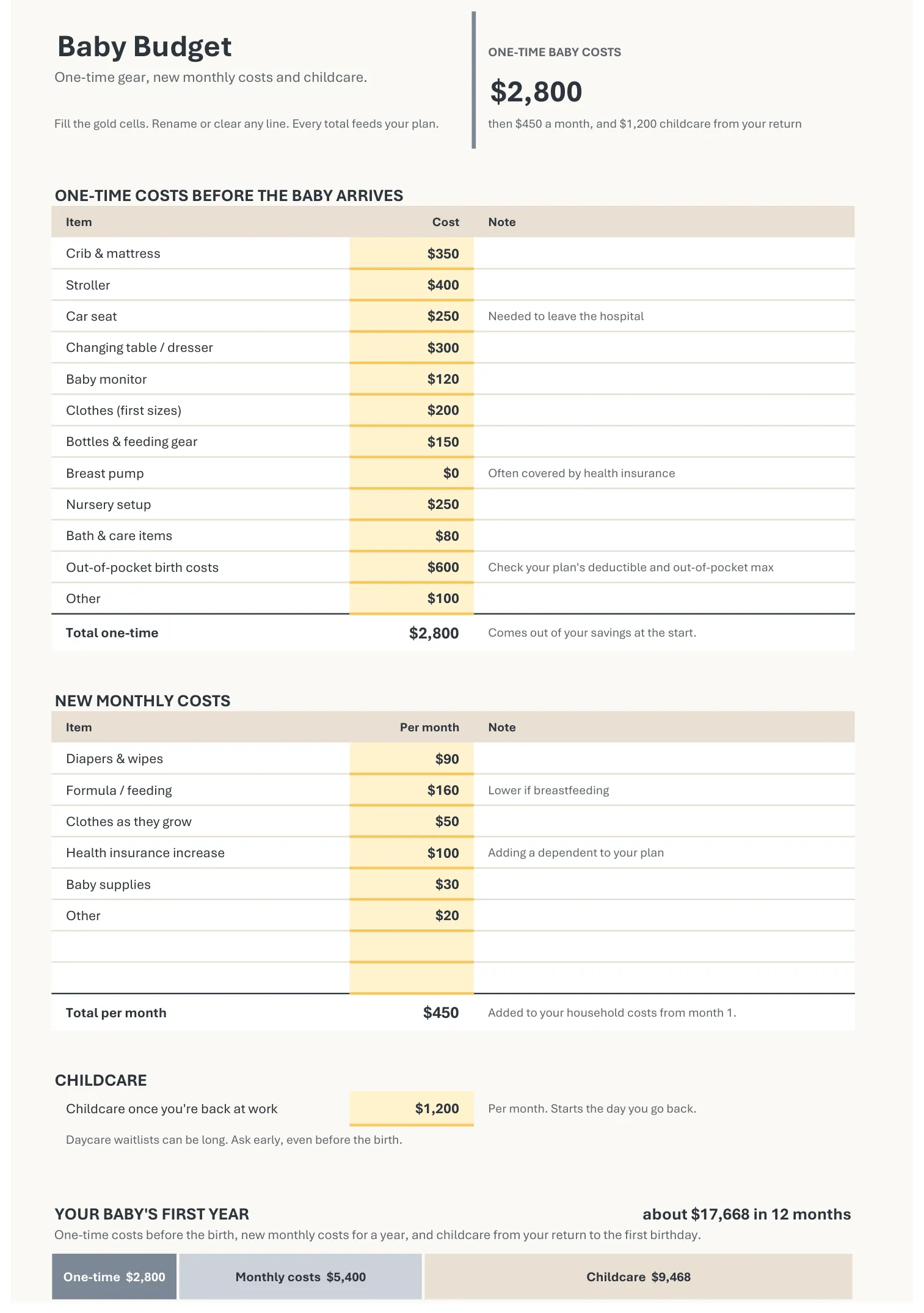
Count what a baby costs.
One-time gear before the birth, new monthly costs and childcare, in three buckets.
- 03
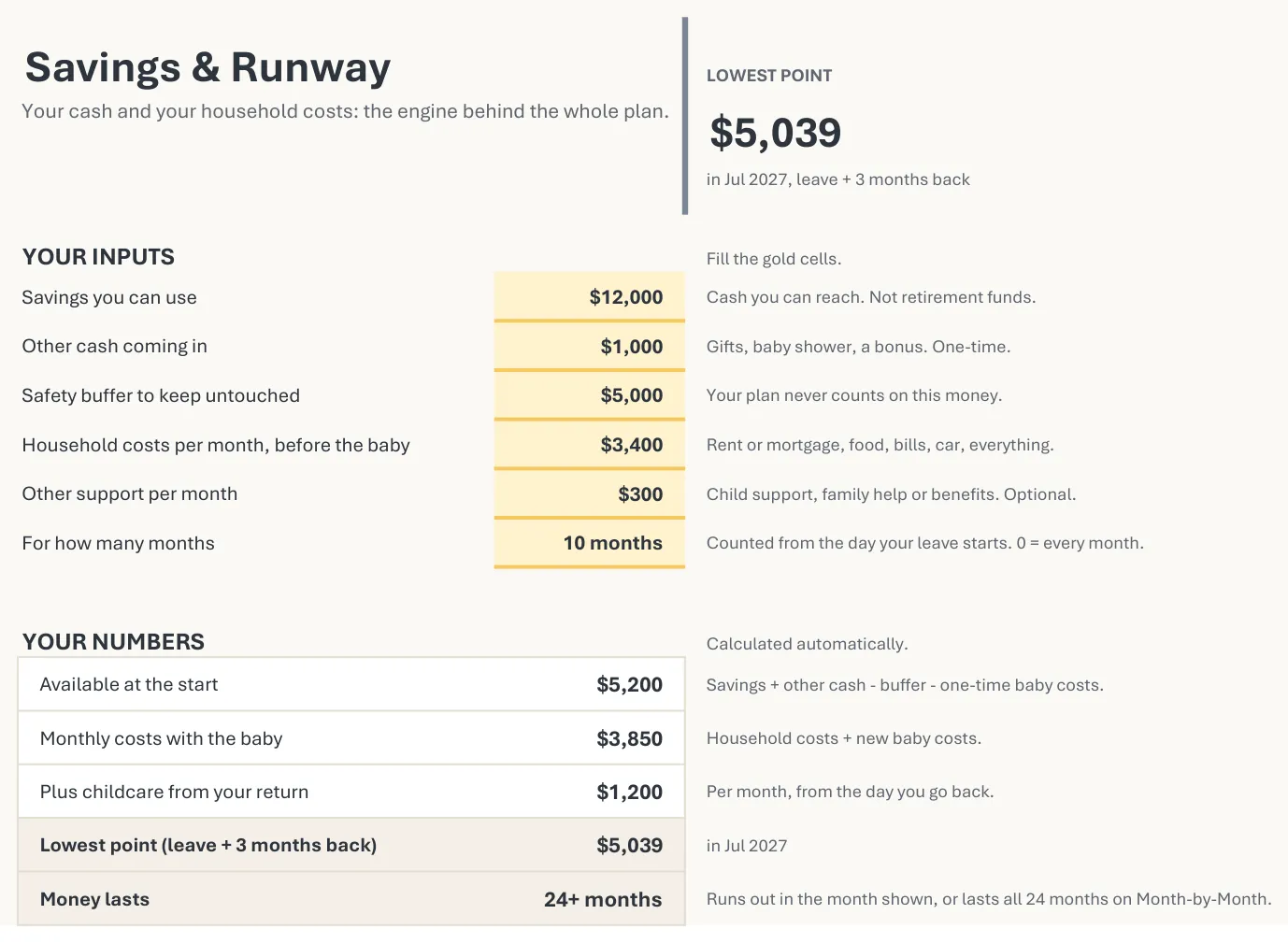
Add your savings and your buffer.
Your savings, your safety buffer, household costs and any regular support.
- 04
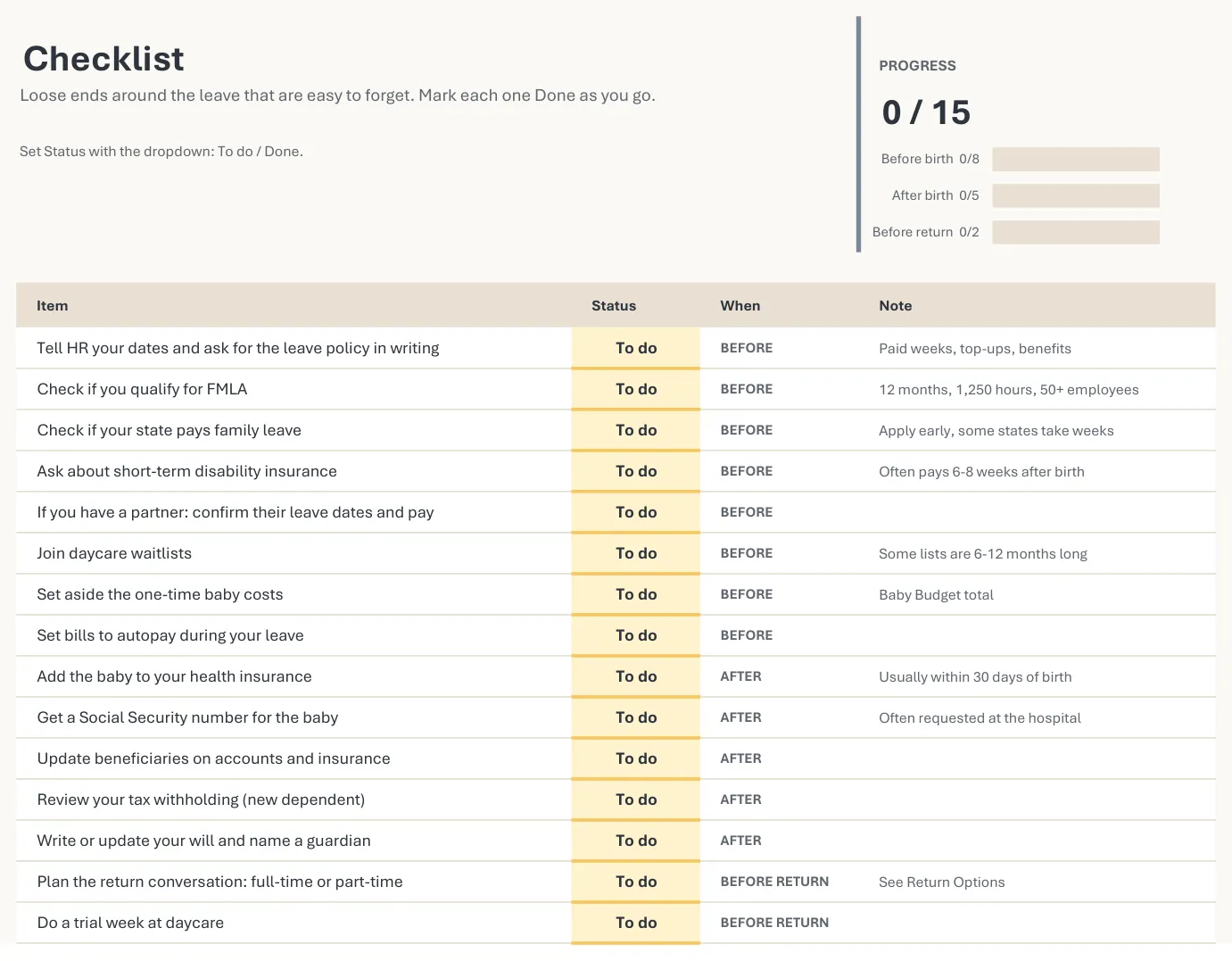
Take care of the practical parts.
15 things to sort out before the birth, after it, and before you go back.
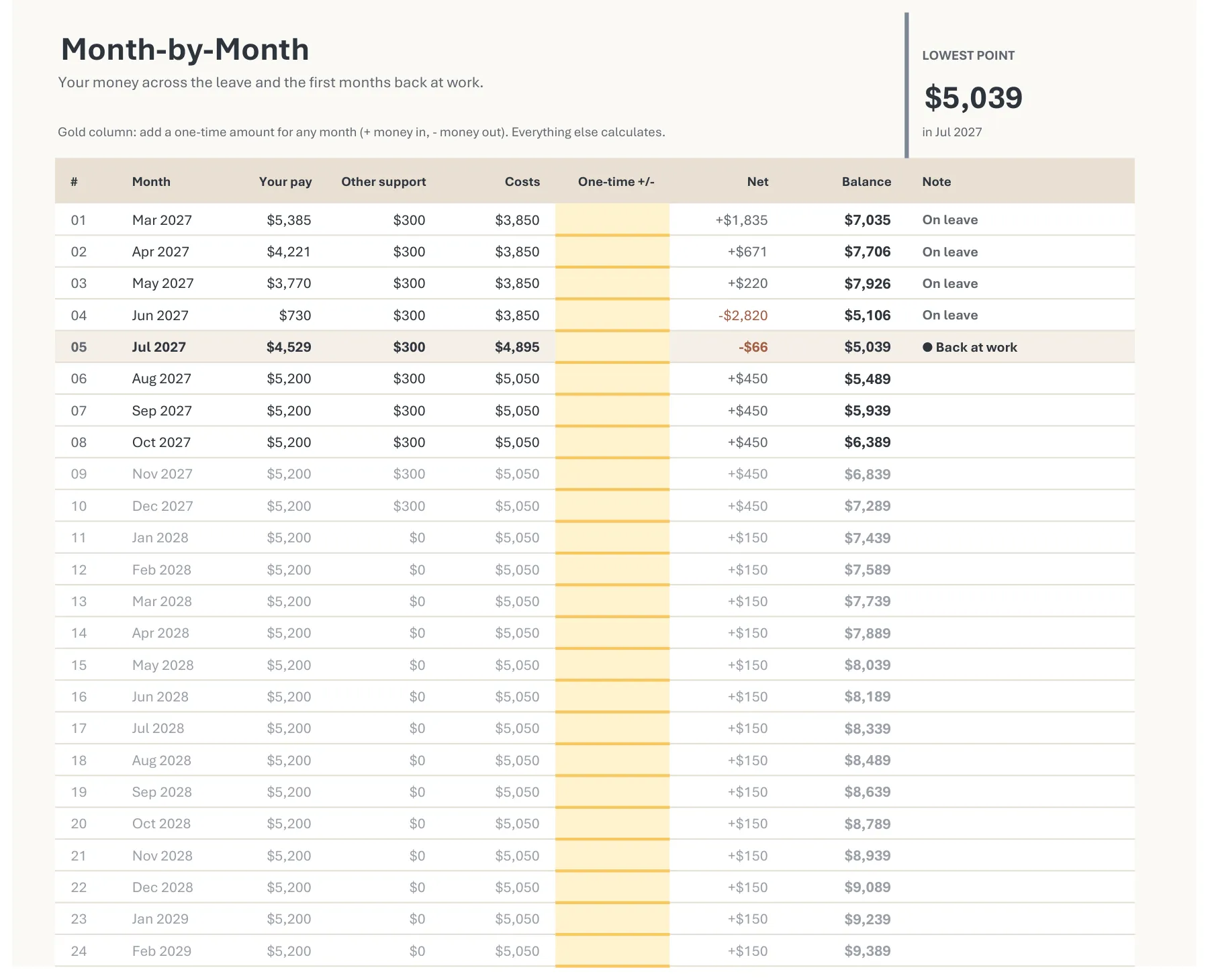
See the month it gets tight.
24 months of pay, costs and balance, with your return month highlighted. Add a one-time amount for any month.
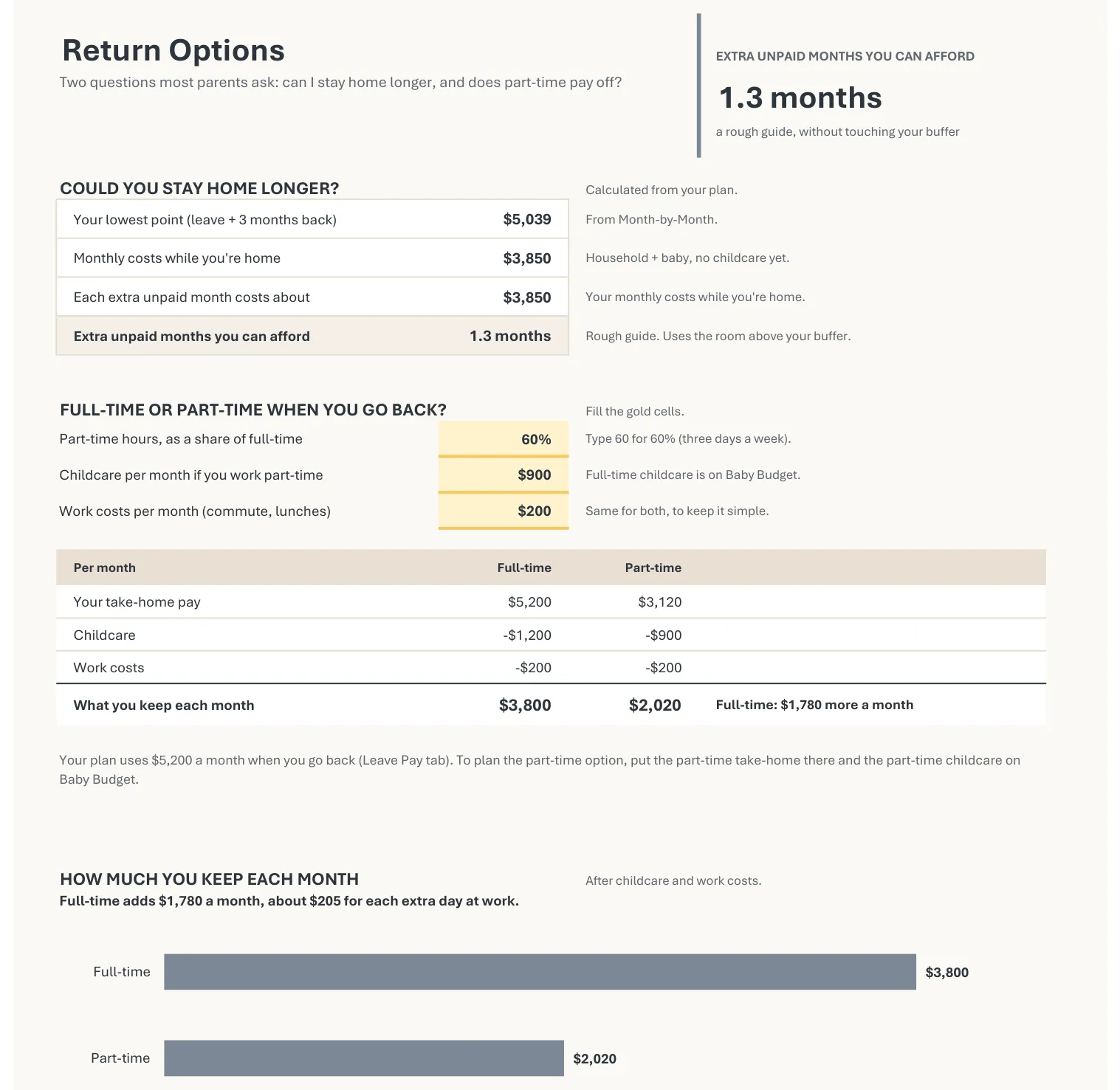
Full-time or part-time? See what you keep.
How many extra unpaid months you can afford, and what full-time vs. part-time leaves you after childcare - down to dollars per extra day at work.
Eight tabs, plus the Playbook.
A 10-page PDF guide: what your leave really pays, what a baby costs, your lowest month and what to do about it, and two worked examples.
- StartYour status, your leave on a timeline, the plus or minus of each month and the money left at the end of each one.
- Baby BudgetOne-time gear before the birth, new monthly costs, childcare and your baby’s first year in one bar.
- Leave PayYour leave in stages - weeks, % of pay and a weekly cap - plus your back-at-work date, and the same for a partner.
- Savings & RunwayYour savings, your safety buffer, your household costs and any regular support.
- Month-by-Month24 months of pay, costs and balance, with your return month highlighted and room for one-time amounts.
- Return OptionsHow many extra unpaid months you can afford, and what full-time vs. part-time leaves you after childcare.
- Checklist15 things to take care of before the birth, after it, and before you go back.
- How it worksEvery number explained in plain English.
- Baby & Leave Playbook10-page PDF
What this does not do.
Better to know before you buy.
- It does not check eligibility.Whether you qualify for FMLA or paid leave is decided by your employer and your state.
- It does not know your state's rates.You type three numbers from your state's website: weeks, % of pay and weekly cap. No state program? Set that row to 0.
- It does not do your taxes.Leave pay is reduced by one tax share you choose.
- It does not connect to your bank.Nothing is tracked or sent. Your numbers stay in the file on your computer.
Questions, answered.
Everything worth knowing before you buy.
What do I get?
One Excel file with 8 tabs - Start, Baby Budget, Leave Pay, Savings & Runway, Month-by-Month, Return Options, Checklist and How it works - plus the Baby & Leave Playbook, a 10-page PDF guide. The file opens with example numbers, so you can see how it works before typing your own.
Do I need to be good at Excel?
Not at all. You only type into the gold cells - everything else works itself out. The file opens with example numbers, so you can see how it works before you change a thing, and the How it works tab explains every number in plain English.
I'm planning on my own. Does it work for me?
Yes, and it opens that way. On the Start tab, Plan for is set to Just me, so the plan uses only your numbers. If you get regular support, such as child support or help from family, there is a place for it and it counts in every month you set.
There are two of us. How do I add a partner?
On the Start tab, switch Plan for to With a partner. Their pay and their leave then join the plan, with their own row on the timeline.
My state has paid family leave. Where does it go?
Leave Pay has a row called State paid leave. Type three numbers from your state's website: the weeks, the % of pay and the weekly cap. If your state has no program, set the weeks in that row to 0. Then set the Unpaid leave row to the weeks you plan to take without pay. FMLA protects your job for up to 12 weeks in total, and paid weeks usually count toward them, so check with HR first. The Playbook walks through this step by step.
I don't live in the US. Can I still use it?
This version is set up for US rules. The leave table works for any country - you can type your own leave stages, % of pay and caps - but the notes and the checklist are written for the US.
Do I need Microsoft Excel?
Yes. It is built and tested in the desktop version of Microsoft Excel, on Windows and Mac. It is not available for Google Sheets or Apple Numbers.
Can I use it on my phone or tablet?
It's made for a computer. Eight tabs of tables and charts are hard to read and fill in on a small screen, so a phone is fine for a quick look, not for planning.
How do I get the files after I buy?
It's an instant digital download. After your purchase, Etsy sends an automated email with the files, and they are also on your Etsy purchases page. Nothing is shipped.
How much does it cost - is it a subscription?
It's a one-time payment, with no subscription and no account to create. The current price is shown on the Etsy listing.
Can I get a refund?
Because it is an instant digital download, returns and refunds are not offered. That's why this page shows every tab before you buy. If a file doesn't open or something looks wrong, contact the shop through your Etsy order.
Where do my numbers go?
Nowhere. It's a file on your own computer - there's no Bright Sorted account, no sign-up, and nothing you type is sent to us.
Can I print it?
Yes. It prints on US Letter paper.
Is this financial advice?
No. It is for planning and information only, and is not financial, tax, legal or medical advice. Leave rules and benefit amounts change - check them with your employer and your state's website. The results depend entirely on the numbers you enter.

Ready to see your whole leave on one page?
You bring the numbers. The sheet shows the month it gets tight.
Bright Sorted tools and products are for general planning purposes only and do not constitute financial advice. For guidance specific to your situation, talk to a qualified financial adviser.